5 Best Voice-to-Text and Dictation Apps for Mac in 2026
If you are looking for the best voice-to-text app for Mac, the landscape has changed dramatically. Thanks to OpenAI's Whisper, Apple Silicon Metal GPU acceleration, and lightweight local LLMs, you no longer have to settle for inaccurate built-in dictation or expensive monthly subscriptions.
Whether you want lightning-fast global cursor typing, offline audio file transcription, or smart developer-first documentation, we benchmarked the top 5 voice dictation software options for macOS in 2026.
Quick Comparison Summary#
| App | Best For | Privacy / On-Device | Global Hotkey Dictation | File Transcription | Price | | :--- | :--- | :---: | :---: | :---: | :--- | | Dicty | Developers & Power Users | 100% On-Device (Metal GPU) | Yes (Zero-latency) | Yes (with Diarization) | 100% Free Core | | Superwhisper | Casual writing & notes | 100% On-Device | Yes | No (Mic only) | $8.49/mo (Pro) | | MacWhisper | Audio/video file transcribing | 100% On-Device | Secondary | Yes (SRT/VTT export) | €64 One-Time | | Wispr Flow | Cloud streaming speed | Cloud-processed (Streaming) | Yes | No | €15/user/mo | | Apple Dictation | Basic casual messages | Mixed (On-device / Apple servers) | Yes | No | Free (Built-in) |
1. Dicty — Best Overall for Developers, Speed & 100% Free Local Dictation#
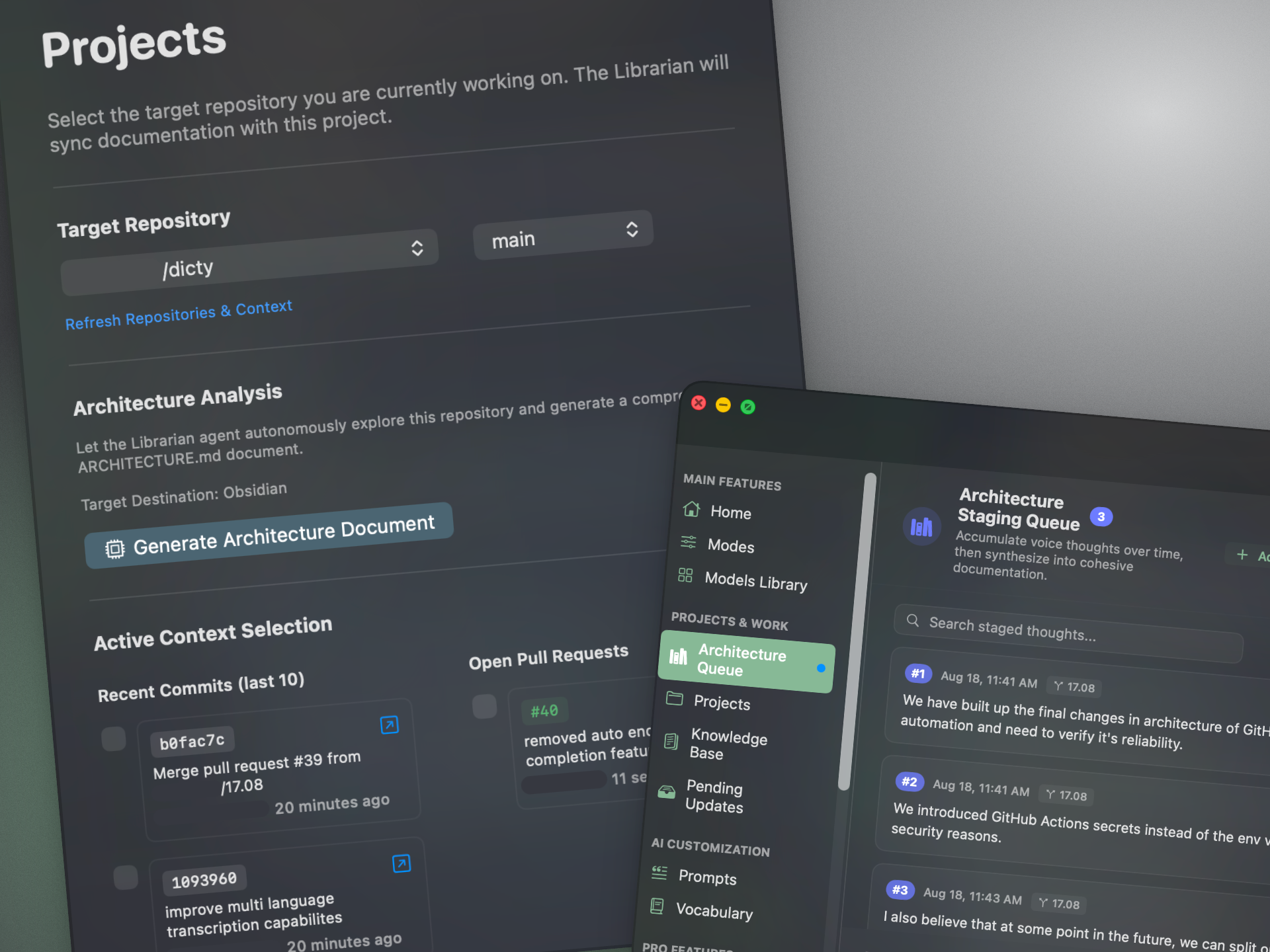
Dicty is a native macOS voice-to-knowledge engine designed specifically for developers, engineers, and privacy-conscious users who want maximum speed and zero recurring subscription fees.
Why It Leads in 2026:#
- Zero-Latency Apple Silicon Metal GPU Shaders: Runs local Whisper models (from Nano to Whisper Ultra Turbo) directly on your Mac's unified memory. Zero audio leaves your computer.
- 100% Free Core Engine: Unlike competitors that paywall longer recordings, custom system prompts, and multiple models, Dicty provides unlimited local dictation and file transcription for $0.
- Active Codebase & Git Context: Connects with Git branches, commit history, and pull requests to ground spoken technical notes into architecture docs (ADRs) and Jira/Linear tickets.
- Audio & Video File Transcription: Drag and drop meeting recordings (MP3, WAV, MP4) for instant local transcription with speaker diarization.
- Bring-Your-Own-LLM Flexibility: Works offline with Ollama and LM Studio or cloud providers (Claude 3.7, GPT-4o, DeepSeek R1).
Pricing: 100% Free for all core local speech features. Optional Pro plan ($4/mo) for managed cloud AI compute quota.
2. Superwhisper — Polished Consumer Dictation with Monthly Subscription#
Superwhisper is a popular menubar dictation utility for macOS. It offers a clean floating UI that types directly into your active text cursor.
Strengths:#
- Smooth global hotkey activation with custom UI styling.
- Local Whisper model execution on Apple Silicon.
- Custom prompt modes for adjusting tone and formatting.
Drawbacks:#
- Requires an $8.49/mo subscription to unlock Pro models, custom AI prompts, and full transcription features.
- Does not support batch transcribing external audio or video files.
- Generic text replacement with no integration into Git or developer issue trackers.
Pricing: $8.49/month or $249+ lifetime license.
3. MacWhisper — Best for Audio & Video File Transcription#
MacWhisper by Jordi Bruin is a dedicated macOS app built around transcribing pre-recorded audio and video files.
Strengths:#
- One-time license purchase (€64) with lifetime updates.
- Excellent subtitle export tools (SRT, VTT, PDF, CSV).
- Drag-and-drop workflow for podcast creators and journalists.
Drawbacks:#
- Interface is heavily designed around managing files rather than ambient, all-day system dictation.
- Lacks intelligent LLM text formatting and style restructuring layers.
- No developer repository or team vault integrations.
Pricing: Free basic tier (Tiny models); €64 one-time for MacWhisper Pro.
4. Wispr Flow — Fast Cloud-Powered Voice Typing#
Wispr Flow provides real-time streaming dictation powered by cloud AI servers.
Strengths:#
- Very fast typing experience that auto-edits filler words.
- Works across multiple applications seamlessly.
Drawbacks:#
- Privacy Concerns: Streams microphone audio to third-party cloud servers, making it unsuitable for proprietary codebases or strict enterprise compliance.
- No Offline Support: Ceases working without an active internet connection.
- Expensive Subscription: Priced at €15/user/month (€180/year).
Pricing: €15/user/month subscription.
5. Apple Built-in Dictation — Best Zero-Setup Option#
macOS includes built-in dictation accessible via the Fn or Microphone key in System Settings.
Strengths:#
- Pre-installed on every Mac with zero configuration required.
- Lightweight and responsive for short iMessage replies.
Drawbacks:#
- Limited vocabulary and frequent struggles with technical jargon, abbreviations, or programming code.
- No LLM post-processing layer (cannot format into lists, markdown, or structured tables).
- Struggles with noisy backgrounds and fast speech.
Pricing: Free.
How to Choose the Right Mac Dictation App#
- If you want the fastest, 100% free offline dictation with code awareness: Choose Dicty.
- If you primarily process recorded interviews and podcasts into subtitles: Choose MacWhisper.
- If you want a simple consumer dictation tool and don't mind a subscription: Choose Superwhisper.
- If you want quick basic dictation without installing anything: Use Apple Built-in Dictation.
Get Started with Dicty on macOS#
Install Dicty in one line via Homebrew:
brew tap dicty-io/dicty && brew install --cask dicty