Operational Modes & Profiles
Customize operational modes, formatting presets, and speaker diarization for every workflow.
Dicty provides dedicated operational modes tailored for quick typing, multi-speaker meetings, longform dictation, and autonomous documentation synchronization.
Overview of Modes#
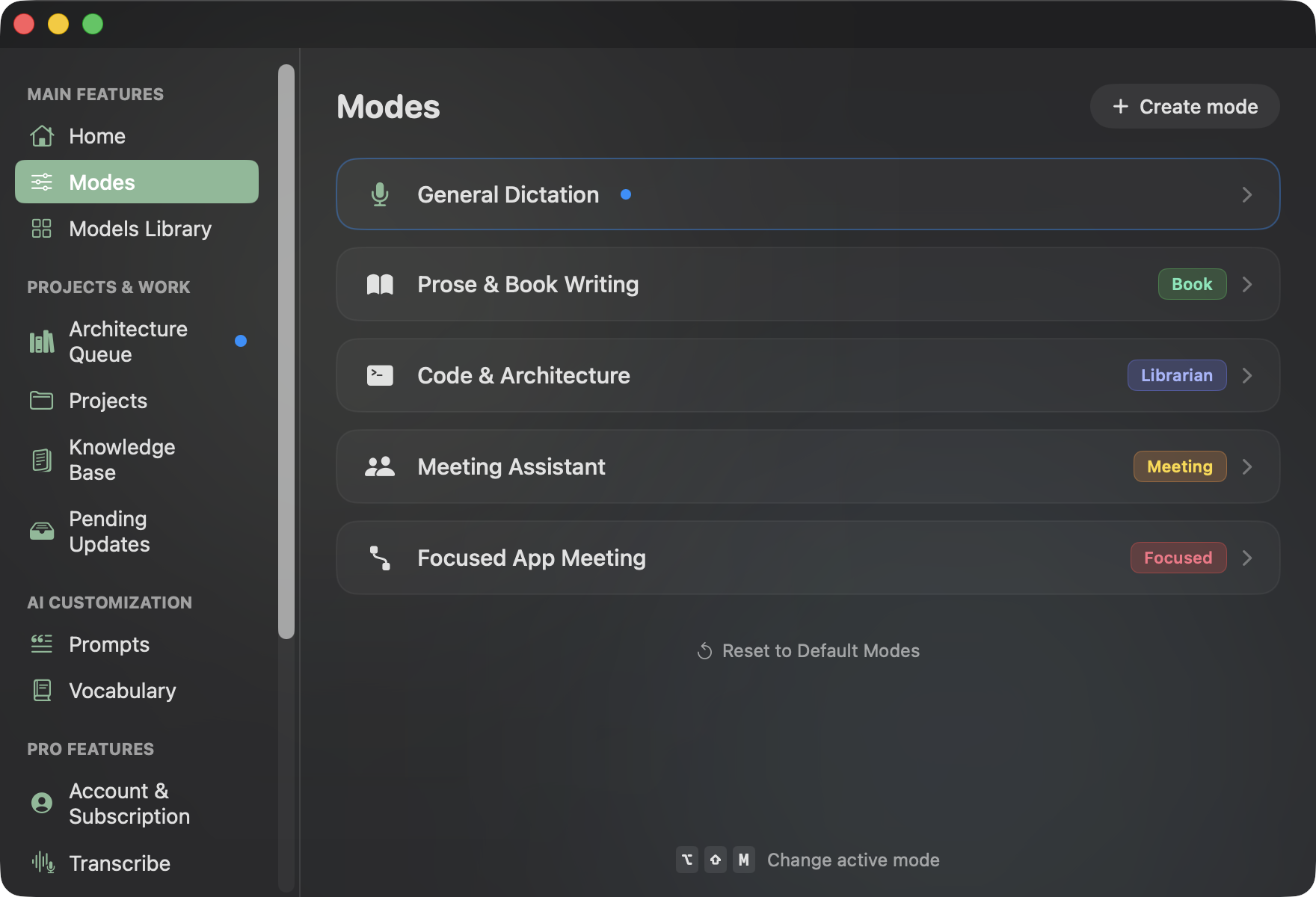
Dicty comes preloaded with five specialized operational profiles:
| Operational Profile | Mode Tag | Target Workflow | Key Capabilities |
|---|---|---|---|
| General Dictation | (Default / Raw) | Zero-latency speech-to-text into active apps | Instant raw transcript, clipboard auto-paste, zero LLM latency |
| Prose & Book Writing | Book | Longform literary & publication prose | Automatic paragraph indents, dialogue quotes, and spoken punctuation parsing |
| Code & Architecture | Librarian | Continuous architectural knowledge sync | Staged thoughts scratchpad, Git branch tracking, Obsidian, Confluence & Linear sync |
| Meeting Assistant | Meeting | Multi-speaker meeting transcription & notes | Continuous recording, Speaker diarization (Alpha), Action item checklists & Summaries |
| Focused App Meeting | Focused | Dual-channel app-filtered meeting capture | Simultaneous recording of Microphone + Target App audio (Zoom, Google Meet, Slack) |
1. General Dictation Mode#
Dictation Mode transcribes your voice directly to the macOS clipboard and pastes it into the active window with minimal latency.
Dictation Styles#
Choose how your spoken voice is formatted before pasting:
| Style | Processing | Description |
|---|---|---|
| Raw Transcript | 0ms (Whisper only) | Unmodified transcript exactly as recognized by the speech model. |
| Fast Punctuation | 0ms (Regex engine) | Instant rule-based punctuation engine that inserts commas, periods, and capitals without LLM latency. |
| Book / Book Prose | LLM Refinement | Formats continuous speech into publication-ready prose with automatic paragraph breaks, dialogue quotes, and punctuation commands (e.g. new line, colon). |
| LLM Refinement | Formats speech into a polite, structured email with greeting, bulleted body, and sign-off. | |
| Message | LLM Refinement | Conversational, concise chat message format ideal for Slack, Discord, or Telegram. |
| Structured Note | LLM Refinement | Markdown outline with headers, bulleted takeaways, and key highlights. |
| Custom Prompt | Custom LLM | Executes custom user-defined instructions from the Prompts tab. |
2. Librarian Mode (Alpha)#
Librarian Mode acts as an autonomous documentation assistant. Instead of pasting immediately, spoken thoughts are accumulated in your Architecture Staging Queue.
- Context Grounding: Consults selected GitHub branches, commits, and pull requests.
- Knowledge Targets: Reconciles notes into Obsidian vaults, Confluence spaces, or Linear Docs.
- Interactive Review: Review side-by-side visual diffs in Pending Updates before publishing.
3. Meeting Assistant Mode (Pro)#
Meeting Mode is engineered for meetings, design discussions, and interviews:
- Continuous Audio Capture: Handles long-duration audio streams without dropping frames.
- Diarization (Alpha): Automatically separates conversational turns between multiple participants (e.g. Speaker 1, Speaker 2, Alex) and attributes spoken statements accurately.
- Meeting Summary & Decisions: Generates an executive summary, key architectural decisions, and an assigned action item checklist.
4. Focused Meeting Mode (Pro)#
Focused Meeting Mode captures dual audio streams simultaneously:
- Your microphone input.
- The internal audio of target communication apps (such as Zoom, Google Meet, Slack Huddle, or Microsoft Teams).
This ensures every remote participant is transcribed with acoustic clarity, even when using headphones.
Managing Profiles#
Open Configuration Setup (⌘ ,) → Modes:
- Create Mode: Click Create mode to spin up custom configurations with SF Symbols icons: .
- Activate: Switch your active profile via the UI or the global HUD (⌥ ⇧ M).
- Reset to Defaults: Restore the standard 5 pre-configured modes anytime.