Multilingual Voice & Real-Time Translation
Dictate in your native tongue and transcribe directly into English or any target language on the fly.
Dicty allows you to speak in one language (e.g. Spanish, German, French, Chinese, Russian, Japanese) and have it automatically translated and transcribed into English or another target language directly at your cursor in real time.
Zero Mental Translation Friction: Think and speak naturally in your native language—Dicty handles vocabulary translation, sentence structure, and grammar so your thoughts are typed cleanly in any app.
Supported Translation Modes#
Dicty provides three flexible translation options depending on your speed and privacy needs:
1. Built-in Offline Translation (Fastest & 100% Private)#
Uses built-in speech models running directly on your Mac:
- Target Output: Translates any spoken language directly into English.
- Speed: Instant with 0ms extra waiting time.
- Privacy: 100% offline—your voice and text never leave your computer.
- Best For: Everyday dictation, instant chat replies, emails, and notes.
2. Local Model Translation (Offline & Any Target Language)#
Routes your transcription through local AI tools (like LM Studio or Ollama) on your Mac:
- Target Output: Translate into any language (e.g. English $\rightarrow$ German, Russian $\rightarrow$ Spanish, French $\rightarrow$ Italian).
- Privacy: 100% offline with zero cloud subscriptions or API keys.
- Best For: Translating between non-English languages privately on your own machine.
3. Cloud AI Translation (OpenRouter / OpenAI)#
Connects to modern AI models (like GPT-4o Mini or Claude) for nuanced style control:
- Target Output: High-accuracy translation in 90+ languages.
- Tone & Style: Automatically fixes slang, adjusts writing tone (Professional, Casual, Creative), and formats lists and paragraphs cleanly.
- Best For: Professional correspondence, international meetings, and polished essays.
How to Configure Translation in Dicty#
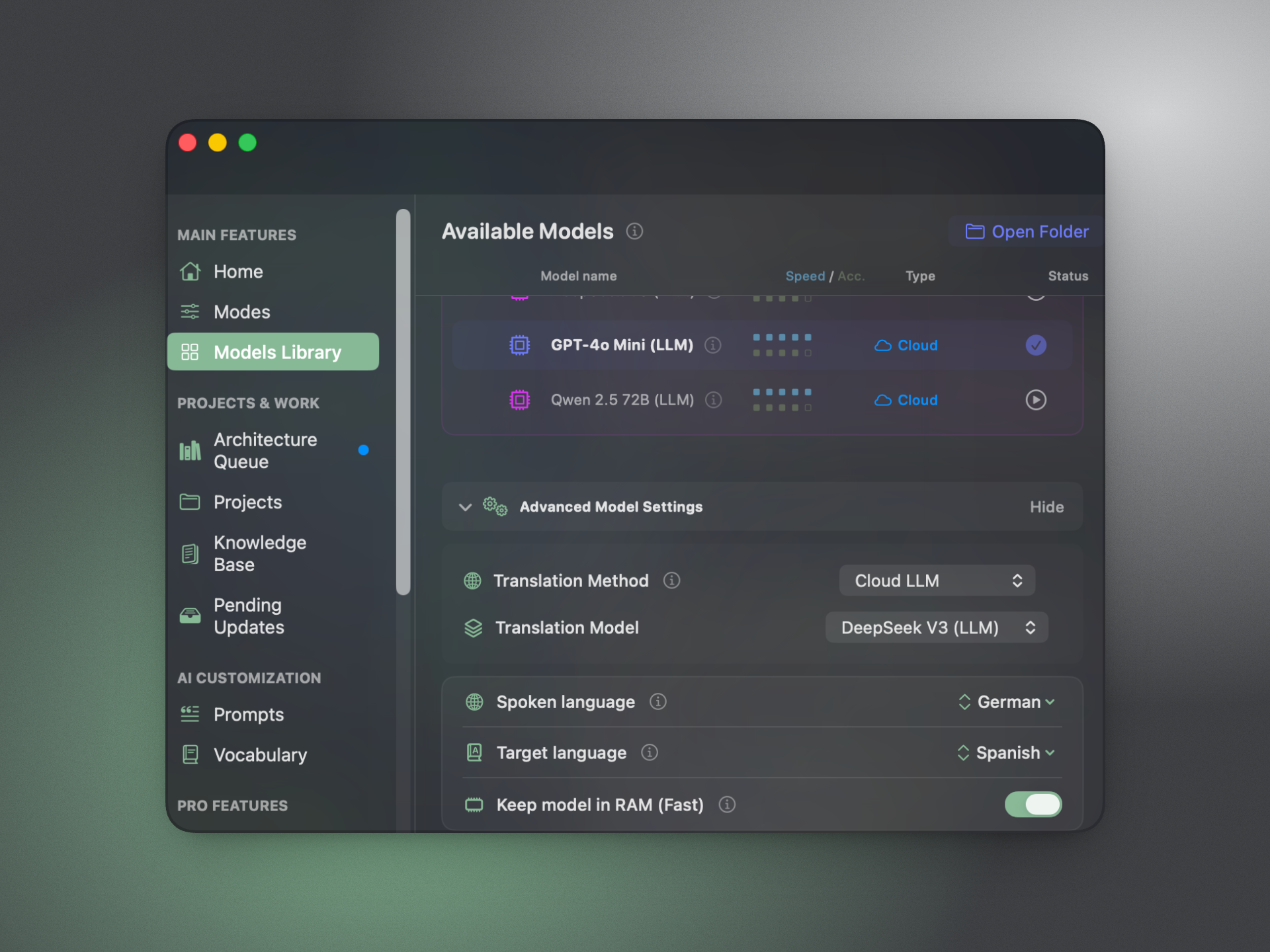
Open Settings (⌘ ,) → AI Engine & Models:
Step 1: Set Spoken Language#
- Auto Detect (Default): Dicty automatically identifies the spoken language within the first 1–2 seconds of audio.
- Exact Language: Manually select your language (e.g. Spanish, German, Japanese) to bypass language identification overhead and gain maximum recognition speed.
Step 2: Toggle "Translate to English"#
- Switch on the Translate to English toggle for instant, one-click Whisper translation to English.
Step 3: Configure Advanced Translation Methods (Optional)#
Expand Advanced Settings:
- Select Translation Method: Choose between
None,Built-in,LM Studio (local), orCloud LLM. - Select Translation Model: Pick your preferred LLM refiner (e.g.
Qwen 2.5 7B,GPT-4o-mini).
Supported Spoken Languages#
Dicty supports over 90+ spoken languages out of the box using multilingual Whisper models (Large V3 Turbo, Base Multi, Fast Multi), including:
| Region | Languages |
|---|---|
| Western & Northern Europe | English, Spanish, French, German, Portuguese, Italian, Dutch, Swedish, Danish, Norwegian, Finnish |
| Eastern Europe & Eurasia | Russian, Ukrainian, Polish, Czech, Romanian, Hungarian, Bulgarian, Greek, Turkish |
| Asia-Pacific | Chinese (Mandarin & Cantonese), Japanese, Korean, Vietnamese, Indonesian, Thai, Tagalog |
| South & Central Asia | Hindi, Bengali, Urdu, Tamil, Telugu, Marathi, Punjabi, Persian (Farsi), Arabic, Hebrew |
Binding Translation to Custom Profiles#
You can bind translation settings to specific Dicty profiles:
- Open Settings (⌘ ,) → Modes & Profiles.
- Create or edit a profile (e.g. "Global Meetings" or "English Dictation").
- Set the translation mode and target language for that profile.
- Switch profiles instantly via the global HUD (⌥ ⇧ M).